Using Mandala Script for Elegant Web Typography
I was halfway through a redesign for a boutique wellness coaching site when I realized the hero section felt flat. The layout had plenty of whitespace and a stunning photography backdrop, but the headline lacked soul. That is exactly when I decided to test Mandala, a script handwritten typeface that promises to be an elegant and clean script font. As a web designer, I am always cautious about using decorative fonts in digital layouts because readability often suffers on mobile devices, but this specific font family caught my eye for its potential as a focal point in modern designs.
Creating Romantic Design Focal Points with Mandala
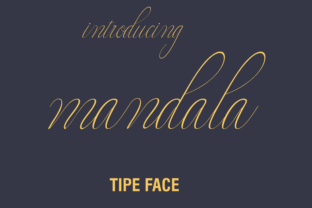
When you are building a brand identity that relies on emotion and trust, the choice of fonts can make or break the user experience. Mandala stands out because it is a thin calligraphy styled font that looks phenomenal when combined with romantic design elements. In my recent project, I replaced a standard sans serif header with Mandala for the main value proposition, and the shift in tone was immediate. The strokes are delicate yet distinct, offering a level of sophistication that thick, bubbly scripts often lack. This makes it an ideal choice for industries like wedding planning, luxury skincare, or high-end coaching where the aesthetic needs to feel personal and refined. By using this typeface as the primary display element, we established a visual hierarchy that guided the user's eye straight to the most important message without needing aggressive colors or oversized buttons.
Optimizing Thin Calligraphy Styles for Mobile Hero Sections
One of the biggest challenges with thin calligraphy styled fonts is ensuring they remain legible on smaller screens. During the testing phase of my project, I had to be strategic about how I implemented Mandala across different breakpoints. While it looks gorgeous as the focal point on desktop monitors, I found that increasing the line height and ensuring sufficient contrast against the background image was crucial for mobile users. Unlike heavier script handwritten options, the elegance of Mandala comes from its fine lines, which can disappear if the resolution is low or the background is too busy. I recommend using this font primarily for short phrases, logos, or H1 headers rather than long paragraphs. For body copy, pairing it with a clean, neutral sans serif font ensures that the content remains scannable while the header provides that necessary emotional hook. This balance allows the font to shine as a decorative accent without compromising the usability of the website.
Pairing Mandala with Modern Sans Serif Fonts for Brand Consistency
A common mistake in web design is mixing too many competing styles, which creates visual noise. Since Mandala is such a strong character, it requires a supportive partner in your typography stack. I found that combining this elegant and clean script font with a geometric sans serif created a perfect equilibrium for the coaching website. The simplicity of the body text allowed the thin calligraphy styled font to take center stage, reinforcing the romantic design vibe without overwhelming the visitor. This approach works exceptionally well for product landing pages and course sales pages where you need to build credibility quickly. When users see a cohesive brand kit where the fonts complement each other, they perceive the business as more professional and established. Whether you are designing a portfolio homepage or a digital brand kit for a client, remember that Mandala excels when it has room to breathe. Do not crowd it with other decorative elements; let the typography do the heavy lifting for your brand identity.
Elevating Digital Ads and Social Media Graphics with Script Handwritten Style
Beyond the website itself, the versatility of Mandala extends into social media graphics and digital ads. In today's visual-first market, consistency across platforms is key to recognition. Because this script handwritten font carries such a distinct personality, it translates beautifully into Instagram stories, Pinterest pins, and email headers. I used Mandala to create quote graphics for the client's social campaign, and the engagement on those posts reflected the premium feel of the typography. It adds a human touch to digital content, making it feel less corporate and more inviting. However, when using it in static images or ads, always check the legibility against various background colors. The thin strokes of Mandala work best on solid colors or lightly textured backgrounds where the contrast is high. This ensures that your message is received clearly, whether the viewer is scrolling quickly on a phone or browsing on a tablet. For anyone looking to upgrade their creative assets, integrating this typeface can instantly elevate the perceived value of your offerings.
Selecting the Right License and File Formats for Web Projects
Before finalizing any design, it is essential to verify the technical specifications and licensing terms of the fonts you intend to use. For a live website, you need to ensure that the webfont files are optimized for fast loading speeds to maintain good Core Web Vitals scores. Mandala is designed to be a premium asset, so checking for included styles, alternates, and multilingual support is a necessary step in the workflow. If you are building a site for an international audience, confirm that the character set covers the required languages. Additionally, always secure the appropriate commercial font license if the project is for a client or a business entity. Using unlicensed assets can lead to legal issues down the road, so treating your typography choices with the same diligence as your code is vital. Once you have the right files in place, implementing Mandala via CSS is straightforward, allowing you to harness its elegant and clean script font qualities across your entire digital presence. By taking these practical steps, you ensure that your romantic design vision is executed flawlessly, providing a polished and professional experience for every user who lands on your page.